 Greetings,
Hope you are doing well today. I will be blogging about how to do a Google search for documents, pictures, and videos. When you go to http://www.google.com/ you need to type in the search box you topic of interest, and then you type the following file extension in quotes:
1. For MS PowerPoint Documents you type “ppt”
2. For MS Word Documents you type “doc”
3. For MS Excel Documents you type “xls”
4. For Adobe PDF Documents you type “pdf”
5. For Flash Videos you type “swf”
6. For a specific phrase you need to type it all in quotes
If you want more options, then click on the right side of the box under Advance Search. Next, you will see the following options under Advance Search.
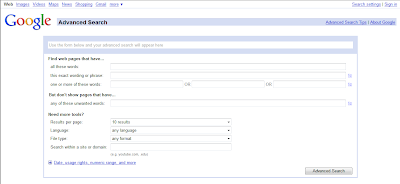
Then you can follow the instructions in the search boxes. If you go to the last topic on Need more tools, you can pull down the drop down arrow boxes to get more options on your search. You can even narrow down the file search to a particular type of file.
 For example, let’s say you are looking for an interactive flash web site when teaching a concept or objective; all you have to do is pull down the drop down box and choose Shockwave Flash. Once you chose this option, then all you will find are flash video sites. Try it out with the water cycle. If you want more search options, please visit the following: Advanced Search Tips
To look for pictures you need to go to http://www.google.com/ and hover your mouse on the top left side of the screen, and you will see a blue Images link. Click on the link, and then type the name of picture you are searching for in the search box. You will do the same for Videos. Hope these helpful tips help you out. I will see you next week with another topic.


