Hello,
Hope you are all doing well. Today I will be blogging about part 2 on how to turn your room into a presentation room. That's right, I will be giving you my own
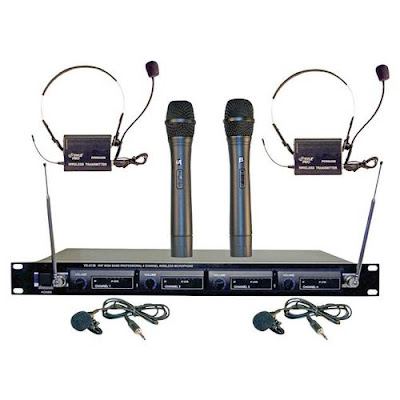
professional recipe, and also reveal the type of system I am currently using in my classroom. If you look at the picture to the left. This is the wireless system I am using in the classroom. This system requires no connection to your computer.
The students are
amazed by it, especially when they get to talk on it, or give presentations. Just this past week, elementary students from first to fifth grade were able to hold the wireless microphone, while I used the
lavaliere microphone clipped to my tie. If you are interested in this system click on the picture above.
The students were so excited to hear their own voice over the speakers in my room.
Several students were able to ask questions, read the daily objective, and give PowerPoint presentations while using the wireless microphones. I think they really cherished and enjoyed this experience.
The professional VHF wireless microphone comes with
4 wireless microphones. I have been using this system for the past 2 years and it is a pretty good system for students to use. Last year during the end of the school year party we pulled out all four microphones plus another corded one I had, and had a great
Karaoke party in my room. The kids really enjoyed the experience to hear their voice amplified
through the system. These are just a few uses you can use the system with.
This is a professional VHF wireless system from Pyle that comes with two handheld microphones, two belt pack transmitters that clip on to your belt with
lavaliere and headset microphones, power on/standby/off switch, four 9 volt
batteries and ¼ audio cable included, RF indicators, AF level meters, individual
volume controls, ¼” individual and mixed output, frequency range: VHF 160-270MHz, operation range: up to 240 ft., power supply: 110/220 V Dimensions: 16.5” x 8.2” x 1.8”
Model Number: Pyle Pro
PDWM4300
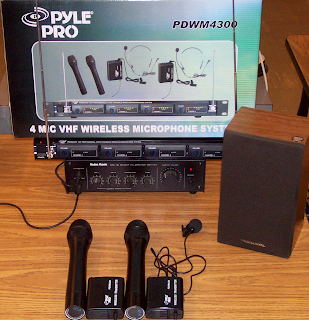
When you look at the picture on the left, you will see the VHF wireless system I am currently using with my students. I also use a corded microphone (not pictured) that you can buy separate. (I use the
Memorex brand) I have the headsets put up in my room.
We get the headsets out on special occasions. I have a
MPA-30 20 Watt PA amplifier 120V/12V by Radio Shack, which is connected to a little speaker that I place in the center of the room. (
By the way, the amplifier, and the speaker were given to me by a close friend of mine, who found out I was using professional microphones in my room.
You see, when you are doing great things in your classroom, people tend to want to help you out!) There are several 20 watt PA amplifiers you can find online, just google them. As I was writing this post I saw some on E
bay, for as little as
$10. Also you will need to get some small speakers (
not computer speakers) to plug into the back of the amplifier. Once you connect all these together you are ready to use it.
By the way if you go to this site you can see the manufacturer’s manual:
http://www.pyleaudio.com/manuals/PDWM4300.pdf The manual will give you even more detail about the system. At the time I was blogging, this professional VHF
wireless system retails for about
$267. You can check it out from the Manufacturers web site at by clicking on
Here. As I said you can build this system for under
$200. When I purchased my system I paid around $110.
Unfortunately the price has gone up. If you are interested in the VHF wireless system, check out the one above to see if these are in your budget.
Ok, we will see you next week, coming up in a few weeks you will hear about the
podcasting and
vodcasting classes I am teaching with a colleague of mine. Talk to you later.
 Your students will enjoy watching the countdown timer when they are in working in small groups, or independent practice. After you have downloaded the program, you can choose different built in alarm sounds to sound off when the time expires. You can even personalize the timer by having a short message scroll across the screen.


