Hello
Today I will be discussing animation tips when working with claymation. One of the most important tips I can tell you is to be careful with your background and remember to keep it simple. Here are 10 animation tips.
1. You can simply use construction paper and different color cut outs as well as clay to make scenic items such as clouds, rain, flowers, trees, etc.
2. When you are planning your claymation video, you may want to shoot the scenes backwards with your digital camera.
3. Take 8 - 15 frames per second of finished video (approximately 450 pictures = 30 seconds of video!)
4. Move your character in small amounts at a time.
5. Have handy some wet wipes to keep your hands clean.
6. Avoid moving items in the scene that are not suppose to move.
7. Change the camera view or zoom occasionally.
8. Make sure you set your camera on a tripod and use fresh batteries.
9 Your digital camera needs to be cleared of all pictures before you start taking pictures.
10. Make sure your students have all their materials and supplies before taking the pictures.
Here are 7 video tips you want to be aware of.
1. Take out any pictures where you can see hands.
2. Add background music, sounds and voices. It can be very challenging to use voices to lip movements in stop motion animation; voice-overs are much easier.
3. When adding music use free sources for educators like http://www.freeplaymusic.com/
4. When filming, set the camera on a tripod close to the background. Make sure the background is in the frame.
5. Once filming begins, make sure the camera does not move.
6. Take many pictures. You can always delete excess pictures later.
7. Move characters approximately 1/4 of an inch between shots.
Check out these examples.
Mario's Pizzaria.
Stop, Drop, and Roll!
The Butterfly Cycle
Transformations
After you have all your pictures, audio, and sound bytes, create one folder on your desktop and place all the items in it. To produce your move you want to use a free movie editing program on your computer called Movie Maker 2.
To find Movie Maker on your computer go to "Start" and the program is either in the accessories folder or in your programs file. Look for the little color film real with a tailing filmstrip icon. You want to be familiar with this program. For a free video tutorial please visit: www.atomiclearning.com/moviemaker2 To put the finishing touches on the movie you will add titles, credits, narration and music in Movie Maker 2.
Free Resources
Royalty Free Music Sites
http://www.partnersinrhyme.com/
www.beatmode.com/free-loops/
www.mfwp101.com/freemusic.htm
www.flashkit.com/loops/
www.hooverwebdesign.com/sounds/index.html
http://www.freeplaymusic.com/
Sound Effects
www.pacdv.com/sounds/index.html
Hope you enjoyed the 3 part series on claymation. We will see you next week with another exciting topic in technology. Take care.
Showing posts with label animation. Show all posts
Showing posts with label animation. Show all posts
September 26, 2010
September 19, 2010
Teaching with Claymation: Part 2 of 3
Greetings,
* To create the bulk and shape of the character you will need to cover the wire with foil folded into strips. You can also use styrofoam as well.
* Colored nonhardening modeling clay
 * You also might want to visit an art and craft store to get plastic eyes, mouths and noses for your character. To mold the clay on your character you can use your fingers ore plastic spoons to shape the clay. If parts of the character will move, it may be easier to make two or more clay pieces of that part such as a winking eye or moving mouth. You can also use the clay to build props like clouds, lakes, rivers, trees, etc. on to colored construction paper for your backdrop or background. You can also use sand, grass, dirt, rocks, twigs, marbles and confetti etc.
After you have all the supplies you are ready to set your stage.
1. When students are working with claymation there should be no more than 4 to a group.
2. Students will need to create a flowmap of step by step of the movement of the story.
3. Make the characters.
4. Make the backdrops or background - The backdrops can be done in a shoebox, shad.ow box, on a chair, in a cubby hole, base of a chair, on colored construction paper or poster board (Remember to keep it simple).
5. Work on lighting - Do you want the characters to stand out more?
6. Think about the camera view, taking the photos and making the movie.
Next week I will be discussing animation tips, video tips, filming tips, producing the movie, adjusting timing, adding titles, credits, narration and music. I will be sharing free tutorials and additional web sites for more ideas. I will also be posting more examples of claymation projects. See you next week.
Today I will be discussing how to build characters and props. I will also talk about how to build your backdrop or background. Let's get started, you will need the following items to build your characters.
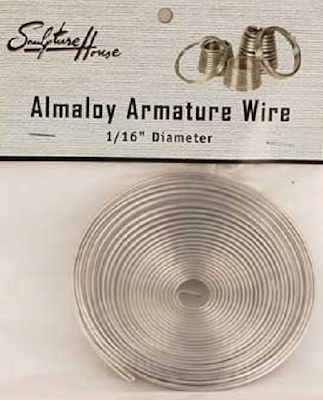
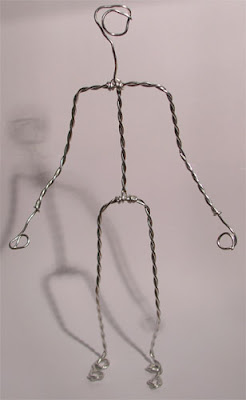
* Armature for the Skeleton, which will provide strength and flexibility.
* To create the bulk and shape of the character you will need to cover the wire with foil folded into strips. You can also use styrofoam as well.
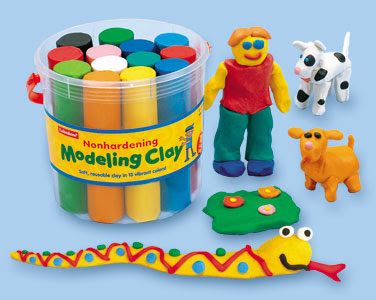
* Colored nonhardening modeling clay
* You also might want to visit an art and craft store to get plastic eyes, mouths and noses for your character. After you have all the supplies you are ready to set your stage.
1. When students are working with claymation there should be no more than 4 to a group.
2. Students will need to create a flowmap of step by step of the movement of the story.
3. Make the characters.
4. Make the backdrops or background - The backdrops can be done in a shoebox, shad.ow box, on a chair, in a cubby hole, base of a chair, on colored construction paper or poster board (Remember to keep it simple).
5. Work on lighting - Do you want the characters to stand out more?
6. Think about the camera view, taking the photos and making the movie.
Next week I will be discussing animation tips, video tips, filming tips, producing the movie, adjusting timing, adding titles, credits, narration and music. I will be sharing free tutorials and additional web sites for more ideas. I will also be posting more examples of claymation projects. See you next week.


September 12, 2010
Teaching with Claymation: Part 1 of 3
Greetings,
Hope you are doing well this week. What is Claymation? Claymation is short for Clay Animation, which includes the following:
1. Any animation using clay, materials and props.
2. Traditionally time - consuming technique of stop motion video.
3. Using a digital cameras and computers provide accessibility in the classroom.
4. Using Movie Maker 2 or a video editing program.
Claymation can be used for:
* Content on a website
* A prop for a speech
* A multimedia story
* A concept or objective demonstration
* A public service announcement
Why do you want to use Claymation?
1. Motivates, engages and challenges students to be creative.
2. Can be applied to any subject level and area.
3. Perfect for exploring concepts and objectives.
4. Requires planning, organizing and teamwork.
More Ideas for Using Claymation in the Classroom.
* Storytelling
* Creative writing
* Explanations of the Scientific processes
* Human body functions
* Visualizing math concepts
* Recreating historical events & time periods
* Demonstrating physical activities - proper exercise
Please play the video below to see how I have used claymation with a PE Objective in the past.
How do I start making a claymation video?
1. Select your idea or objective you want to communicate to your audience.
2. Plan and build a flow map of your idea.
3. Start building your character and background or back drop for your movie.
4. Take photos of movement of the character.
5. Make the Movie.
In the next 2 weeks, I will be sharing with you the following ideas:
How to build your character with clay, armature, foil, styrofoam, construction paper, small eyes, mouths, etc. and props (rocks and sticks). How to set your stage, claymation tips, animation tips, video tips, filming, editing and producing the film. I will also be sharing with you more claymation videos. To produce one video, your students may want to work in groups and it may take 3 -5 days for the project to finish. See you next week.
Hope you are doing well this week. What is Claymation? Claymation is short for Clay Animation, which includes the following:
1. Any animation using clay, materials and props.
2. Traditionally time - consuming technique of stop motion video.
3. Using a digital cameras and computers provide accessibility in the classroom.
4. Using Movie Maker 2 or a video editing program.
Claymation can be used for:
* Content on a website
* A prop for a speech
* A multimedia story
* A concept or objective demonstration
* A public service announcement
Why do you want to use Claymation?
1. Motivates, engages and challenges students to be creative.
2. Can be applied to any subject level and area.
3. Perfect for exploring concepts and objectives.
4. Requires planning, organizing and teamwork.
More Ideas for Using Claymation in the Classroom.
* Storytelling
* Creative writing
* Explanations of the Scientific processes
* Human body functions
* Visualizing math concepts
* Recreating historical events & time periods
* Demonstrating physical activities - proper exercise
Please play the video below to see how I have used claymation with a PE Objective in the past.
How do I start making a claymation video?
1. Select your idea or objective you want to communicate to your audience.
2. Plan and build a flow map of your idea.
3. Start building your character and background or back drop for your movie.
4. Take photos of movement of the character.
5. Make the Movie.
In the next 2 weeks, I will be sharing with you the following ideas:
How to build your character with clay, armature, foil, styrofoam, construction paper, small eyes, mouths, etc. and props (rocks and sticks). How to set your stage, claymation tips, animation tips, video tips, filming, editing and producing the film. I will also be sharing with you more claymation videos. To produce one video, your students may want to work in groups and it may take 3 -5 days for the project to finish. See you next week.
June 27, 2010
Part 2 of What is IVC?
 Greetings,
This week I will be sharing more of the free activities we participated in during the event. Remember you can also participate in these activities with your students. Here are 7 of the most popular ones:
1. Monster Match Exchange
2. Animal Exchange
3. Community Exchange
4. Read Around the Planet
5. Math Marvels
6. Mystery Quest Beaches
7. Whirlidurb: Shane Sings
1. Monster Match Exchange Project: Two classrooms are paired up and each class will have the opportunity to draw their own monster. The first class will communicate or write a description of their monster and post it online. The second class will then get the opportunity to draw a monster that matches the description of the first classroom. Both classes will meet via video conference to compare and contrast the original drawing of their monsters. For more information on this exciting project please visit: www.humbleisd.net/monster/ and http://disdvideoconferencing.pbworks.com/Monster+Exchange


3. Community Exchange Project: Both classes will prepare a presentation about a community to share with the other class. The presentation should be about 5 minutes, and include visuals. Here are a few ideas that you may want to include in your project: information about demographics of community; cultural institutions, zoos, museums; schools including size, curriculum, structure; a map of the community/city/state; type of food that is popular, favorite sporting events and trivia. After each class presents via video conferencing there will be time for questions and answers.
4. Read Around the Planet Project: This is a project that celebrates National Education Association's Read Across America. Classrooms use interactive video conference to connect with other classrooms "around the planet" and read to each other. The presentation should be about 5 minutes and can be related to reading or promoting literacy. Here are a few ideas that a project may include: skits or plays, raps or songs; puppet show, readers theater, poetry, sign language, illustrations, dramatizations, student-centered books, original poetry, songs and trivia. For more information on this project please visit: www.twice.cc/read

5. Math Marvels Project: Both classes will prepare problem solving and communicating solutions/strategies using higher order thinking skills. Students will create math problems to communicate via video conference to each other to solve. The two classes will use good math problem solving skills and use various strategies/discussions. Students will need to create problems that have an answer of a number before the video conference. After each class has had time to solve the math problem, they will share their response via video conference. For more exciting information about this project, please visit: http://katyvc.pbworks.com/Math-Marvels

6. Mystery Quest Beaches Project: Both classes will prepare a 5 to 7 minute presentation on a mystery beach. Each class may divide researching the clues for their beach. When creating the presentation, students will need to clearly communicate effective clues to the other class via video conference. You may use the following ideas to create clues: region, location and place.
Beach Clues:
Region
1. Describe how land and sea areas define the country's borders.
2. What other landmarks are close to the beach?
Location
1. What is the latitude or longitude of the beach?
2. What is the relative location of this beach?
3. Which direction from the country capitol do you travel to reach the beach?
Place
1. What body of water is closest to the beach?
2. What is the area of the country in which the beach is located?
3. What is the primary language of the country in which the beach is located?
4. What is the population of the country in which the beach is located
5. Name and describe a tourists attraction near your beach and illustrate if possible.
6. What is the population of the nearest city?
7. Describe one or more notable physical landforms in or near this city.
Once all the clues have been communicated from both classes via video conference (30 min.), then the research begins on the Internet (20 min.) to figure out the location of the beach. After all questions are answered, then each group will present their answers to the other class. Both classes will need to create a visual poster with the correct name of their beach. The correct mystery of the beaches will be revealed by students at the end of the video conference.
For more information on this project and to get a notes template, please visit: http://mysteryquest.wikispaces.com/

7. Whirlidurb Project: Introduce video conferencing to you early childhood classes through different animated characters that will be singing and asking them questions. The different animated characters are created with animated avatars that the presenter uses to communicate with your class. Your students will absolutely love this activity. For more information on this program, please visit: http://shanesings.whirlidurb.com/

These were just a few activities and projects you can participate in with video conferencing equipment. I hope you get the opportunity to conduct a virtual field trip or a video conference event with your students. We will see you next week with another exciting topic.
Subscribe to:
Posts (Atom)

