Total Pageviews

Showing posts with label clay. Show all posts

September 19, 2010

Teaching with Claymation: Part 2 of 3

Greetings,

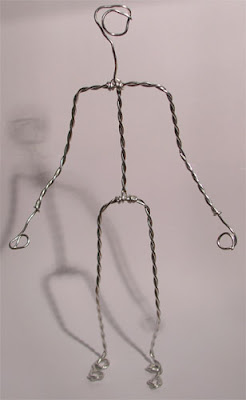
Today I will be discussing how to build characters and props. I will also talk about how to build your backdrop or background. Let's get started, you will need the following items to build your characters.

* Armature for the Skeleton, which will provide strength and flexibility.
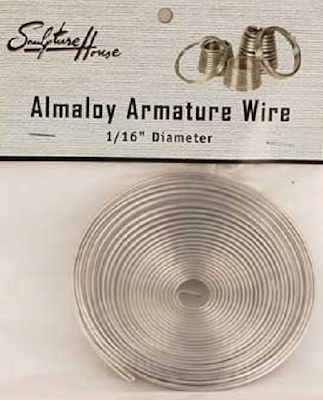


* To create the bulk and shape of the character you will need to cover the wire with foil folded into strips. You can also use styrofoam as well.
* Colored nonhardening modeling clay
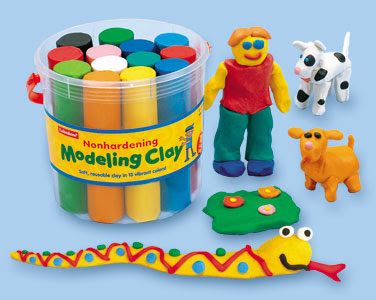
* You also might want to visit an art and craft store to get plastic eyes, mouths and noses for your character.
To mold the clay on your character you can use your fingers ore plastic spoons to shape the clay. If parts of the character will move, it may be easier to make two or more clay pieces of that part such as a winking eye or moving mouth. You can also use the clay to build props like clouds, lakes, rivers, trees, etc. on to colored construction paper for your backdrop or background. You can also use sand, grass, dirt, rocks, twigs, marbles and confetti etc.
After you have all the supplies you are ready to set your stage.
1. When students are working with claymation there should be no more than 4 to a group.
2. Students will need to create a flowmap of step by step of the movement of the story.
3. Make the characters.
4. Make the backdrops or background - The backdrops can be done in a shoebox, shad.ow box, on a chair, in a cubby hole, base of a chair, on colored construction paper or poster board (Remember to keep it simple).
5. Work on lighting - Do you want the characters to stand out more?
6. Think about the camera view, taking the photos and making the movie.
Next week I will be discussing animation tips, video tips, filming tips, producing the movie, adjusting timing, adding titles, credits, narration and music. I will be sharing free tutorials and additional web sites for more ideas. I will also be posting more examples of claymation projects. See you next week.

September 12, 2010

Teaching with Claymation: Part 1 of 3

Greetings,

Hope you are doing well this week. What is Claymation? Claymation is short for Clay Animation, which includes the following:

1. Any animation using clay, materials and props.

2. Traditionally time - consuming technique of stop motion video.

3. Using a digital cameras and computers provide accessibility in the classroom.

4. Using Movie Maker 2 or a video editing program.

Claymation can be used for:

* Content on a website

* A prop for a speech

* A multimedia story

* A concept or objective demonstration

* A public service announcement

Why do you want to use Claymation?

1. Motivates, engages and challenges students to be creative.

2. Can be applied to any subject level and area.

3. Perfect for exploring concepts and objectives.

4. Requires planning, organizing and teamwork.

More Ideas for Using Claymation in the Classroom.

* Storytelling

* Creative writing

* Explanations of the Scientific processes

* Human body functions

* Visualizing math concepts

* Recreating historical events & time periods

* Demonstrating physical activities - proper exercise

Please play the video below to see how I have used claymation with a PE Objective in the past.

How do I start making a claymation video?

1. Select your idea or objective you want to communicate to your audience.

2. Plan and build a flow map of your idea.

3. Start building your character and background or back drop for your movie.

4. Take photos of movement of the character.

5. Make the Movie.

In the next 2 weeks, I will be sharing with you the following ideas:

How to build your character with clay, armature, foil, styrofoam, construction paper, small eyes, mouths, etc. and props (rocks and sticks). How to set your stage, claymation tips, animation tips, video tips, filming, editing and producing the film. I will also be sharing with you more claymation videos. To produce one video, your students may want to work in groups and it may take 3 -5 days for the project to finish. See you next week.